
 +86-755-8637 7711










Accessdatabase sharing
Somecustomers have a kind of requirement that how to share Access Database.
Here is the solution:
Step 1 :
Setting Database sharing in the computer sever
Look for the folder of iccard in computer server, thenshare it .
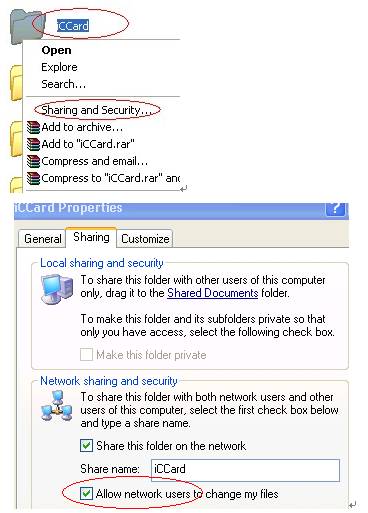
Notice: pls select this option,then the client can writing privilege to database , otherwise only to read.
.......................................................................................................................................................................
Step 2:
visit the sharing database in client computer.
Run the program “Server_setttion.exe” which under thesoftware installation directory.
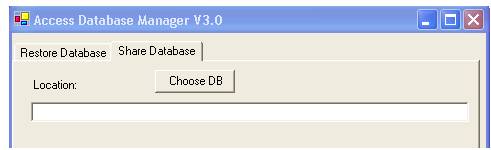
Click share database , then click “choose DB” ,choose theshared database iccard.
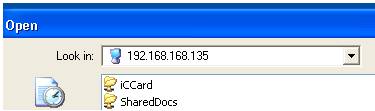
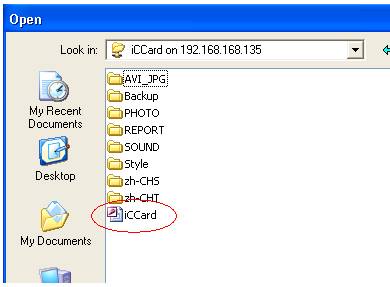
Finally ,click “test connection”.
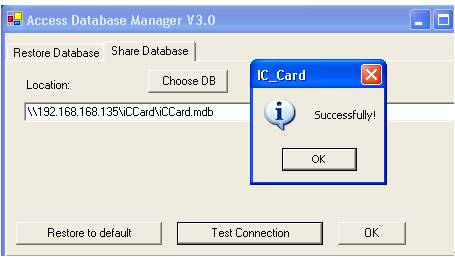
If you want to restore the default database ,pls click “Restore to default”.
 Home
Home
 Add: Room 417, Sun\'gang Building, No. 23, Baogang
 Tel: +86-755-8637 7711
  Fax: +86-755-8276 2979
  Website: